
HubSpot
Three ways AI is improving the HubSpot CRM experience
AI is improving the HubSpot CRM experience across three distinct levels: in-app through the Breeze assistant, externally via chat assistant connectors to ChatGPT, Claude, and Google Gemini, and at the command line with the new HubSpot Agent CLI. Together, they let users interact with CRM data wherever they’re most comfortable working.
HubSpot is doing something smart here. Rather than forcing everyone into a single way of working, they’re meeting users at their level of AI expertise — from the generalist who never leaves the HubSpot interface, to the power user who lives in a terminal window. I use all three daily, and each serves a different purpose. Here’s what’s working, what’s not, and where this is heading.
What is the Breeze assistant and how does it help inside HubSpot?
Breeze is HubSpot’s built-in AI assistant. If you’ve been around HubSpot for a while, you might remember it as ChatSpot or Copilot — the earlier version that never quite lived up to its promise. The problem wasn’t HubSpot’s; the underlying models just weren’t good enough at tool calling yet. That’s changed. The models powering Breeze now — drawing on GPT-level and Anthropic models — are genuinely capable.
The headline feature is custom report building. You describe what you want — “show me deals won this quarter by deal type, grouped by owner” — and Breeze builds the chart or table. If you’ve ever tried to build a multi-object report in HubSpot manually, you’ll know it’s a bit like building a pivot table in Excel for the first time: not impossible, but fiddly and unintuitive if you don’t do it regularly. Now you just describe what you’re after and point it in the right direction.
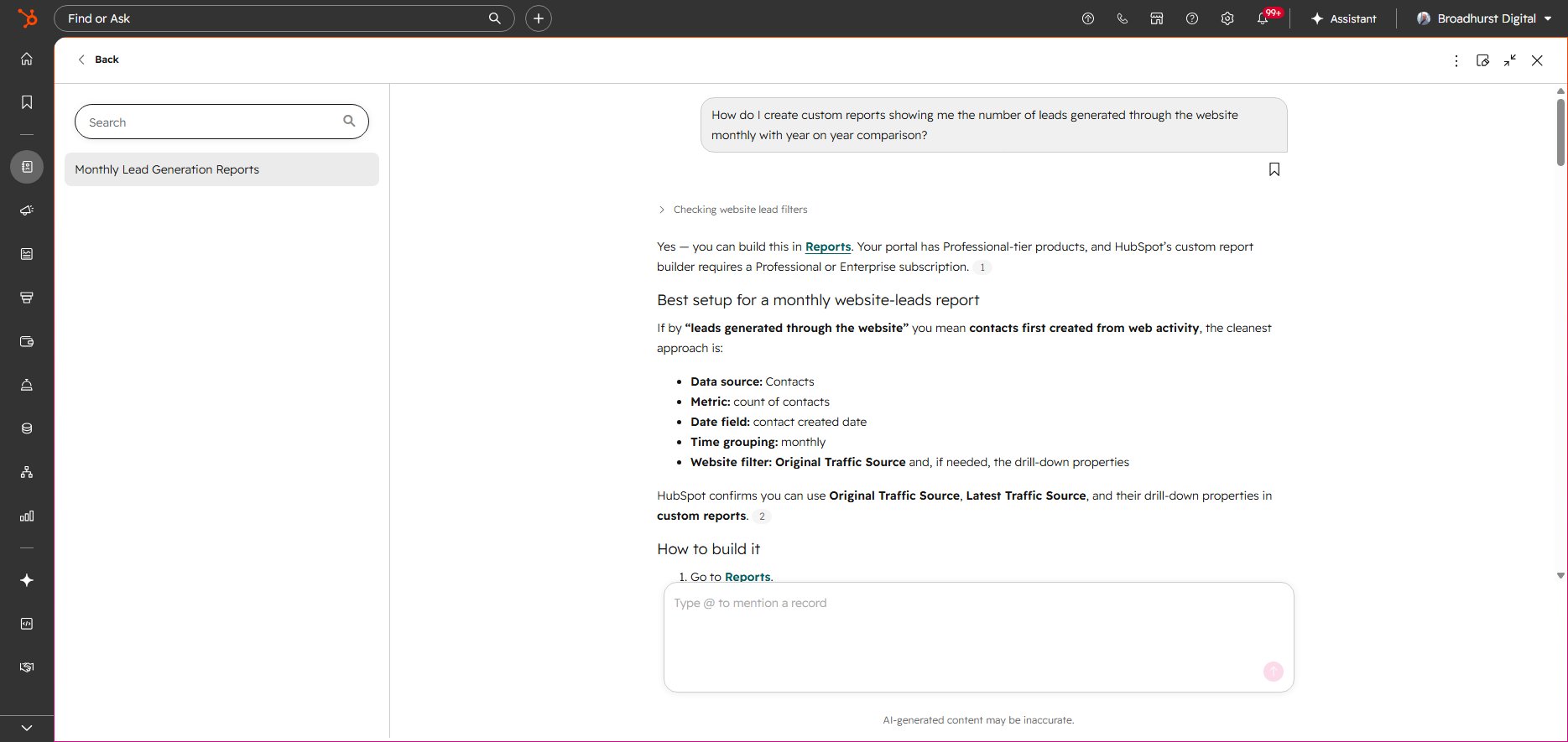
Breeze building a custom report from a plain-English request.
It’s also surprisingly useful for knowledge questions. HubSpot ships updates constantly, and keeping up with where features live is a full-time job in itself. You can ask Breeze “where do I configure lifecycle stage pipelines?” or “how do I build a list of contacts who opened an email but didn’t click?” and it’ll walk you through the filters to apply. Gets you there much faster than hunting through the knowledge base.
There’s also a “build with AI” option scattered across the UI — for workflows, reports, social posts, and more. It’s a quick way to get a first draft rather than starting from a blank canvas.
I won’t oversell it, though. Breeze isn’t 100% accurate. It sometimes presents reports where it’s clearly misinterpreted the data — pulling from the wrong property or misunderstanding the relationship between objects. With workflows and list filtering, it doesn’t always pull out the best option, or even a working one when one exists. It tends to look at basic object properties rather than associated object properties, and it struggles to combine criteria like list membership alongside property filters. With workflows, it sometimes misses actions and configurations.
But this is day one. Fast forward 18 months and I’d expect most of these issues to be resolved. The trajectory is right.
If you’re setting up a new portal or reviewing an existing one, Breeze is worth experimenting with — but don’t rely on it blindly. If you’re auditing your HubSpot setup, it’s a helpful starting point, not a replacement for understanding your data model.
How do external AI assistant connectors work with HubSpot?
This is where things get interesting if you already spend your day in ChatGPT, Claude, or Google Gemini. All three now have connectors to HubSpot CRM, and they bring your CRM data into the environment where you’re already working.
The connectors have a limited scope by design. You can deploy them as read-only or read/write, and only on a specific set of objects. This is sensible — you don’t want an AI assistant casually rewriting your deal pipeline without you knowing about it.
What it enables is interfacing with your CRM without the “clicky clicky” of navigating through UI screens. You ask a question in natural language and get a response. ChatGPT can pull data, run multiple queries, and create visualisations — genuinely useful for individual sales reps who want a quick read on their pipeline without building a report.
A practical example: if your email inbox and Slack are also connected to your AI assistant, you can ask it to check your open deals and surface any where there’s been an inbox or Slack conversation but the deal hasn’t been updated in HubSpot. That’s a genuinely useful workflow that would take several minutes of manual cross-referencing.
I’ll be honest — as someone who works with HubSpot every day, I rarely log into the portal directly now. I interface with it heavily through my Claude account. It’s much quicker. I appreciate that as an AI power user, this natural language interface isn’t for everyone. But if you’re comfortable talking to an AI assistant, it’s incredibly straightforward.
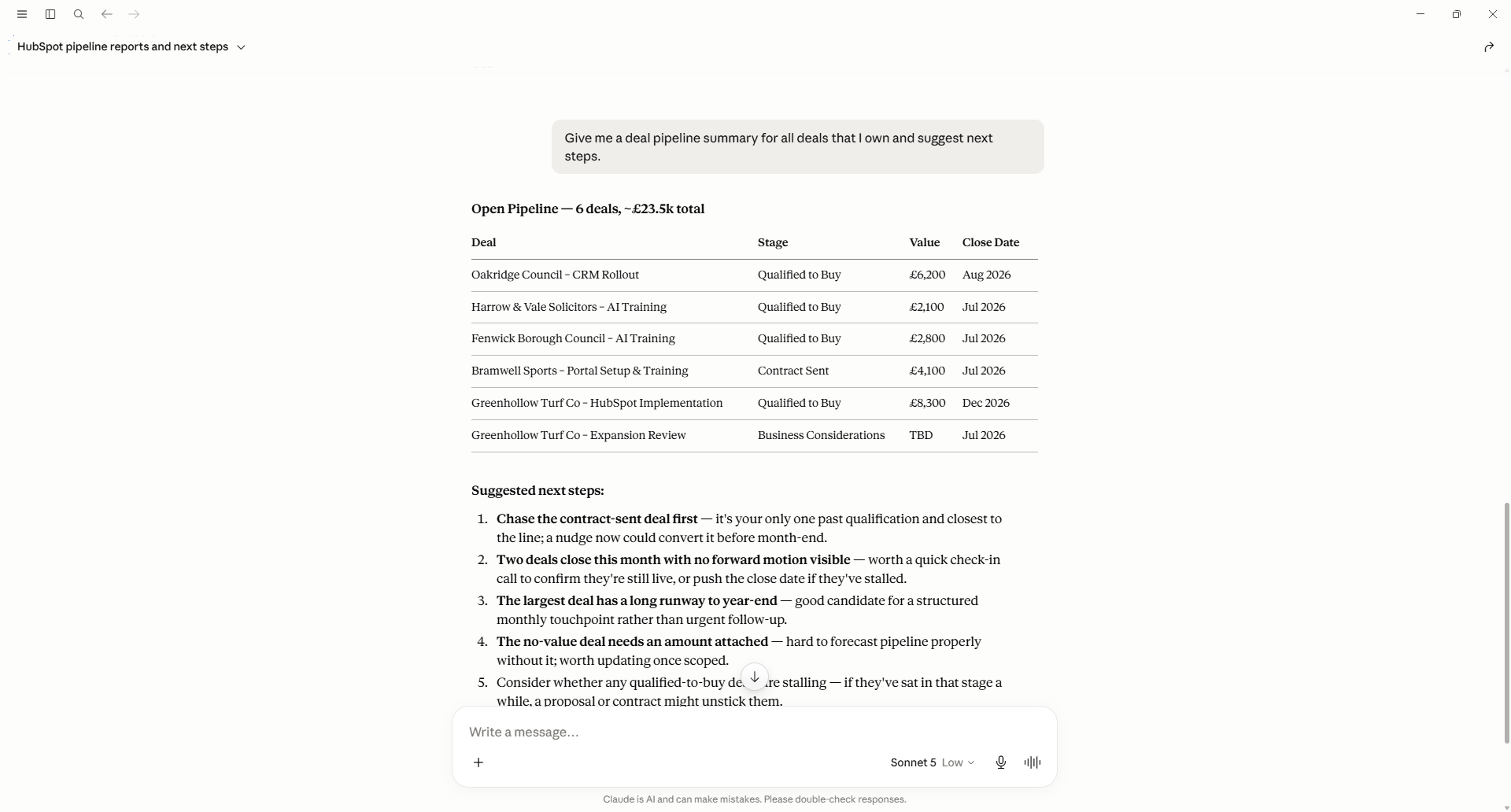
Claude with the HubSpot connector enabled — CRM queries without opening the portal.
The advantage over Breeze is that you can combine your HubSpot data with third-party data integrations in the same conversation. If you’ve got connectors to other tools, you can ask questions that span multiple systems — something Breeze can’t do yet.
If you’re going through HubSpot onboarding or working through a CRM setup checklist, getting these connectors configured early is worth doing. It changes how you interact with the system.
What is the HubSpot Agent CLI and who is it for?
HubSpot has had a CLI for a while — the hs command line tool — but it was primarily for CMS design and development. Upload a file, watch for changes, deploy a theme. Useful if you’re a developer, irrelevant if you’re not.
The new HubSpot Agent CLI, currently in public beta, is a different beast entirely. It’s aimed at power users who want to manage CRM operations from the terminal, and it has vastly more capability than its predecessor.
You can update properties, create objects, and manage objects through a pipeline — all the CRUD operations you’d previously need an API key and custom scripts for. But the headline feature, at least for me, is workflow building. I recently deployed a workflow in less than a fifth of the time it would have taken to build manually in the UI. For first-time portal setups or complex automation projects, this is a massive time saver.
There’s a nuance: you still need to go into the UI to connect emails specifically. There may be a way to do it from the CLI, but I haven’t found it yet. The practical approach is to plan out the whole workflow from the command line, then make a few targeted changes in the UI rather than building every node manually.
Beyond what I’ve used directly, the new Agent CLI brings several capabilities the old hs tool didn’t have:
- Natural language interaction: Rather than memorising CLI command syntax, you can issue instructions in plain English — “create a custom property called Renewal Date on the deal object” — and the agent interprets and executes the request.
- Multi-step automation: The agent can chain several operations together in response to a single prompt — querying objects, updating properties, and enrolling records into workflows — rather than requiring a separate command for each action.
- Local project scaffolding and content generation: Beyond the old CLI’s file-upload capabilities, the agent can scaffold new projects, generate templates and modules with AI assistance, and handle development tasks that previously required manual coding or the UI.
This is my sweet spot. I spend a good chunk of my day in a terminal anyway, and being able to manage HubSpot from there without context-switching into a browser is a genuine productivity boost. If you’re interested in how I approach HubSpot automation and AI-powered consultancy, this is where the two worlds meet.
Which approach should you use?
It depends on how you work:
- Breeze is for the general HubSpot user who wants help inside the interface — building reports, answering “how do I…” questions, and drafting content. No setup required beyond having it enabled.
- External connectors are for people who already live in ChatGPT, Claude, or Gemini and want to bring CRM data into that workflow. Best for combining HubSpot data with other systems.
- Agent CLI is for power users and developers who want maximum control and speed from the command line.
There’s no wrong answer. The strength of HubSpot’s approach is that they’re not betting on a single interface. They’re giving you options based on where you’re already comfortable.
FAQ
Is Breeze accurate enough to rely on?
Not entirely. It’s good for report building and knowledge questions, but it sometimes misinterprets data or builds workflows that don’t quite work. Treat it as a fast first draft, then verify. It’s improving quickly, though.
Do I need a paid ChatGPT or Claude subscription to use the connectors?
Yes. The HubSpot connectors for ChatGPT, Claude, and Google Gemini require the respective paid tiers that support external connectors or actions. Check OpenAI, Anthropic, and Google for current pricing.
Is the Agent CLI available to all HubSpot users?
It’s in public beta, so access may be limited. Check HubSpot’s developer documentation for current availability and requirements.
Can Breeze and external connectors access the same data?
Not necessarily. Breeze works within your HubSpot portal boundaries. External connectors can combine HubSpot data with data from other connected services, which is a key advantage.
Will these tools replace the need for a HubSpot consultant?
They’ll change what a consultant does — less manual building, more strategic design and oversight — but the tools still need someone who understands data models, pipeline design, and automation logic. If anything, the gap between a well-configured portal and a poorly-configured one will widen.
Hats off to Dharmesh Shah and the team for embracing agents so wholeheartedly. Rather than building a single AI feature and calling it done, they’re threading AI through the entire platform at three different levels of technical depth. As a member of the HubSpot Partner Advisory Council for 2025–2026, I find it genuinely exciting to see where this is heading. The pace of improvement is fast, and the direction is right.
If you’re working out how to get the most from AI in your HubSpot portal — whether that’s Breeze, external connectors, or the Agent CLI — book a call and we can talk through what makes sense for your setup.